Index
This page contains my notes from:
a) Relational Database: Design and Implementation - 4th Edition by Jan L. Harrington
a) Relational Database: Design and Implementation - 4th Edition by Jan L. Harrington
Index for notes A1.1:
Chapter 0: Books, Blogs, and BlahChapter 4: Entities And Relationships
Chapter 5: Relational Data Model
Chapter 6: Relational Algebra
Interesting Links
Books, Blogs, and Blah
-
Chapter 4: Entities And Relationships
Introduction
- A data model is how we express data relationships in a Database Management System (DBMS).
- Relational, NoSQL, Graph, Key-Value are all examples of data models that a DBMS might use.
- Relational, NoSQL, Graph, Key-Value are all examples of data models that a DBMS might use.
Entities and their Attributes
- Entity: Something about which we store data. Eg. customer, item, a doctor's appointment.
- Attributes: Data that describes the entity. Eg. a customer will be described by their name, address, phone number etc.
- Each group of attributes that describes a single real-world occurrence of an entity represents an instance of an entity.
- The attributes of an entity must be single-valued. This means every single intersection of a row and a column must contain exactly one piece of data. So no lists, arrays, or multiple entries are allowed inside a single database cell. Why? If you don't follow this, querying the data becomes expensive. For eg. if a cell stores the languages that a dev knows as an array, then querying the DB for which devs know Python becomes very expensive.
- Entity-relationship (ER) diagrams (ERDs) provide a way to document the entities in a database along with the attributes that describe them.
- There are different ways that you can do this. We will be using UML diagramming style.
- Attributes: Data that describes the entity. Eg. a customer will be described by their name, address, phone number etc.
- Each group of attributes that describes a single real-world occurrence of an entity represents an instance of an entity.
- The attributes of an entity must be single-valued. This means every single intersection of a row and a column must contain exactly one piece of data. So no lists, arrays, or multiple entries are allowed inside a single database cell. Why? If you don't follow this, querying the data becomes expensive. For eg. if a cell stores the languages that a dev knows as an array, then querying the DB for which devs know Python becomes very expensive.
- Entity-relationship (ER) diagrams (ERDs) provide a way to document the entities in a database along with the attributes that describe them.
- There are different ways that you can do this. We will be using UML diagramming style.
Domains
- Each attribute has a domain which is the permissible values for that attribute.
- Thus, a domain controls what values can actually be input in a particular cell of a column.
- Thus, a domain controls what values can actually be input in a particular cell of a column.
Question: What are some common gotchas that can arise when deciding on a domain for a column?
Answer:
a)
- The Rule: If you aren't going to perform mathematical operations on it (adding, subtracting, averaging), it’s not a number. Store it as a string.
b)
- The Rule: For money, always use DECIMAL (or NUMERIC), where you explicitly state the exact precision (e.g., DECIMAL(13, 4) to store up to 9 billion with 4 decimal places for fractional cents).
c)
- The Rule: Use a Foreign Key lookup table instead of an ENUM.
d)
- The Rule: Use native unbounded TEXT types if your specific DBMS handles them without a performance penalty.
e)
- The Rule: Always use TIMESTAMP WITH TIME ZONE (or store everything strictly as UTC integers).
f)
- The Rule: Use a numeric column type when you need numeric ordering or calculations.
Answer:
a)
Numbers That Aren't Numbers
: Storing identifiers like Zip codes, phone numbers, or social security numbers as numeric types (INT, BIGINT etc). You lose leading zeros. A zip code like 02134 (Boston) becomes the integer 2134. Furthermore, phone numbers often require international plus signs (+1) or extensions, which instantly break numeric columns.- The Rule: If you aren't going to perform mathematical operations on it (adding, subtracting, averaging), it’s not a number. Store it as a string.
b)
Using Floating-Point for finances
: Floating-point numbers are designed for scientific calculations where speed matters more than absolute precision. They use binary fractional approximations, which introduces rounding errors. 0.1 + 0.2 might end up as 0.30000000000000004, which will throw off your financial balancing.- The Rule: For money, always use DECIMAL (or NUMERIC), where you explicitly state the exact precision (e.g., DECIMAL(13, 4) to store up to 9 billion with 4 decimal places for fractional cents).
c)
Using ENUMs
: Using native database ENUM types for fields that seem fixed, like order_status ('pending', 'shipped', 'delivered'). When you inevitably need to add 'returned', 'cancelled', or 'partially_refunded', updating an ENUM type can require a heavy schema migration.- The Rule: Use a Foreign Key lookup table instead of an ENUM.
d)
Using text length limits
: Setting arbitrary limits like VARCHAR(50) for names or VARCHAR(255) for URLs.- The Rule: Use native unbounded TEXT types if your specific DBMS handles them without a performance penalty.
e)
Not enforcing Timezones
: Storing dates and times using a generic TIMESTAMP or DATETIME without enforcing a timezone domain. The database will default to the server's local time. If your server is in New York (EST) and you migrate your database to a cloud server running on Coordinated Universal Time (UTC), or if your app scales to users across the globe, all your historical timestamps will suddenly be offset by hours.- The Rule: Always use TIMESTAMP WITH TIME ZONE (or store everything strictly as UTC integers).
f)
Numbers Stored as Strings
: Be careful when applying MAX or similar functions to a column that stores numbers but uses a STRING type. Values may be compared as text rather than as numbers, so the result can be unpredictable; for example, "9" may sort after "10".- The Rule: Use a numeric column type when you need numeric ordering or calculations.
Basic Data Relationships: One-to-One Relationship
- For a relationship to be one-to-one, two conditions must be true at the same time:
a) Any instance of A (Ai) can only connect to zero or one instance of entity B.
b) Any instance of B (Bi) can only connect to zero or one instance of entity A.
- Eg. A Spouse (Ai) can have zero or one Partner (Bi). A Partner (Bi) can have zero or one Spouse (Ai). If either person tries to add a second connection, the system breaks.
- Note: If you think you are dealing with a one-to-one relationship, look at it very carefully. Be sure that you are not really dealing with a special case of a one to-many relationship or two entities that should really be one (meaning they should be two columns within the same table)
a) Any instance of A (Ai) can only connect to zero or one instance of entity B.
b) Any instance of B (Bi) can only connect to zero or one instance of entity A.
- Eg. A Spouse (Ai) can have zero or one Partner (Bi). A Partner (Bi) can have zero or one Spouse (Ai). If either person tries to add a second connection, the system breaks.
- Note: If you think you are dealing with a one-to-one relationship, look at it very carefully. Be sure that you are not really dealing with a special case of a one to-many relationship or two entities that should really be one (meaning they should be two columns within the same table)
Basic Data Relationships: One-to-Many Relationship
- For a relationship to be one-to-many, two conditions must be true at the same time:
a) Any instance of A (Ai) can connect to zero, one, or more instances of entity B.
b) Any instance of B (Bi) can only connect to zero or one instance of entity A. (same as one-to-one relationship)
Eg. A woman may have zero, one, or more biological daughters; a daughter can have only one biological mother.
a) Any instance of A (Ai) can connect to zero, one, or more instances of entity B.
b) Any instance of B (Bi) can only connect to zero or one instance of entity A. (same as one-to-one relationship)
Eg. A woman may have zero, one, or more biological daughters; a daughter can have only one biological mother.
Basic Data Relationships: Many-to-Many Relationship
- For a relationship to be many-to-many, two conditions must be true at the same time:
a) Any instance of A (Ai) can connect to zero, one, or more instances of entity B.
b) Any instance of B (Bi) can connect to zero, one, or more instances of entity A.
a) Any instance of A (Ai) can connect to zero, one, or more instances of entity B.
b) Any instance of B (Bi) can connect to zero, one, or more instances of entity A.
Weak Entities and Mandatory Relationships
- Mandatory Relationship occurs when the existence of an entity dictates that it must be associated with at least one instance of another entity.
- In the context of a DB, this would mean that the record requires a
- For eg. an Order entity cannot exist without a Customer entity. An Order entity must have a link to one Customer entity. This makes it a mandatory relationship.
- And in this case, the Order entity would be an example of a Weak Entity. It does not possess a true primary key of its own. It requires the parent's primary key just to form its own primary key. The Customer is the strong entity in this scenario and the Order entity would use the primary key of the Customer to form its own primary key.
- Putting it together, a weak entity always implies a mandatory relationship with its identifying strong entity. Deleting the strong entity means that the weak entity should also be deleted.
- But do note that the inverse is not true, ie, a mandatory relationship does not imply a weak relationship. For eg. an employee must be associated with a department, but an Employee has its own primary key, making it a strong entity.
- In the context of a DB, this would mean that the record requires a
NOT NULL foreign key value. - For eg. an Order entity cannot exist without a Customer entity. An Order entity must have a link to one Customer entity. This makes it a mandatory relationship.
- And in this case, the Order entity would be an example of a Weak Entity. It does not possess a true primary key of its own. It requires the parent's primary key just to form its own primary key. The Customer is the strong entity in this scenario and the Order entity would use the primary key of the Customer to form its own primary key.
- Putting it together, a weak entity always implies a mandatory relationship with its identifying strong entity. Deleting the strong entity means that the weak entity should also be deleted.
- But do note that the inverse is not true, ie, a mandatory relationship does not imply a weak relationship. For eg. an employee must be associated with a department, but an Employee has its own primary key, making it a strong entity.
UML Diagram Example
- To understand the relationship of one entity to another, you need to look at the symbols at the ends of the connecting line.
- Base Symbols:
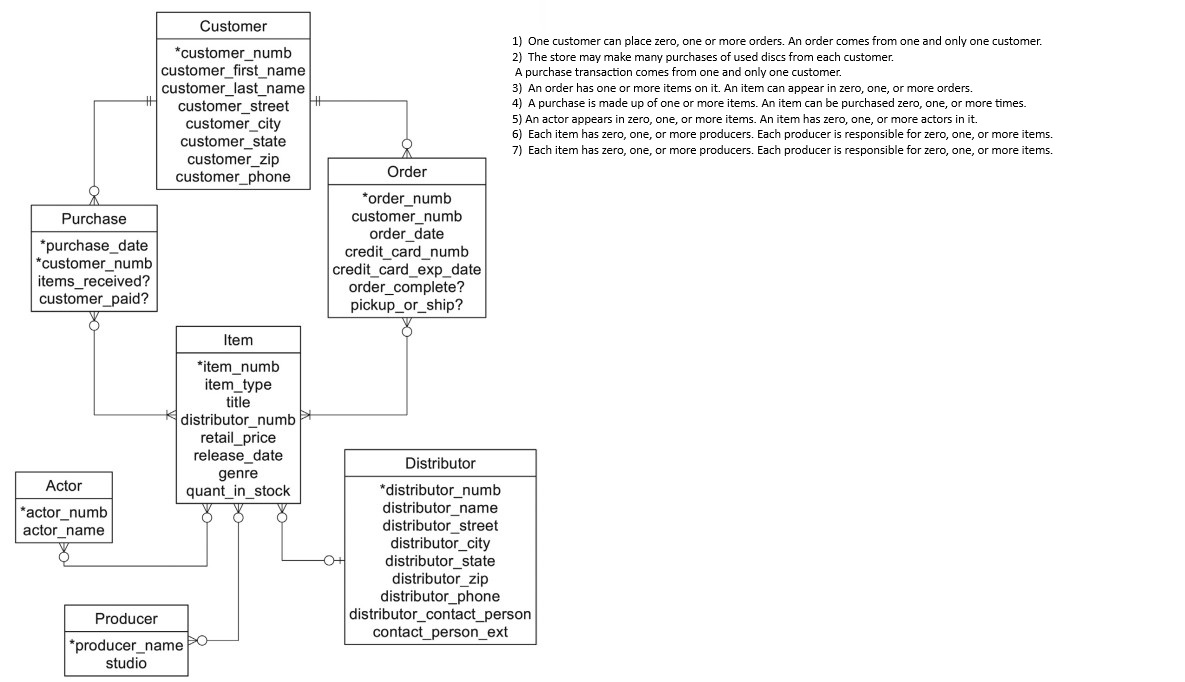
- Base Symbols:
- Line
|: Represents "One" - Circle (
oor0): Represents "Zero/Optional" - Crow's foot (
<or>or}): Represents "Many"
||: Mandatory. Exactly one instance must exist.|o: Zero or One. Optional. Can exist, but max of one.>|: One or many. Mandatory. Must have atleast one, but can be infinite.>o: Zero or many. Optional. Can have none, one, or infinite.
Show Image 
Dealing with Many-to-Many Relationships
- RDBMS (Relational DBMS) cannot natively implement direct many-to-many relationships. Relational models rely on Foreign Keys pointing to Primary Keys to establish links. If you try to
directly link two entities in an M:N relationship, you would need to store multiple foreign key values in a single column, which violates the First Normal Form (1NF) of database
normalization.
- To solve this you introduce what is known as a Composite Entity in the middle.
- A composite entity has the following characteristics:
- There is nothing stopping us from connecting 3 or more independent entities into a single relationship record.
- For eg. consider Doctor, Patient, Drug entities. Doctor A treats Patient B. Patient B takes Drug C. Doctor A is authorized to prescribe Drug C. We are losing context if Doctor A was the one who actually prescribed Drug C to Patient B. To solve this, we introduce a Prescription entity.
- To solve this you introduce what is known as a Composite Entity in the middle.
- A composite entity has the following characteristics:
- Foreign Keys: It must contain atl least two foreign keys, which reference the rpimary keys of the two entities it connects.
- Composite Primary Key: Often, the primary key of this new entity is a combination of those two foreign keys (a composite key).
- Payload Attributes: It can contain its own attributes that describe the relationship itself, rather than describing the individual parent entities.
Expand Gist 
- For eg. consider Doctor, Patient, Drug entities. Doctor A treats Patient B. Patient B takes Drug C. Doctor A is authorized to prescribe Drug C. We are losing context if Doctor A was the one who actually prescribed Drug C to Patient B. To solve this, we introduce a Prescription entity.
Expand Gist
Chapter 5: Relational Data Model
The "Relation" part of a Relational Database
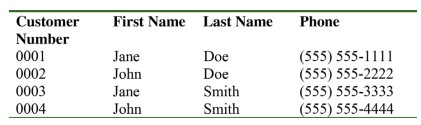
- In mathematical set theory, a relation is the definition of a table with columns (attributes) and rows (tuples)
- For a table that looks like below, the relation would be written like
- The preceding expression is a true relation, an expression of the structure of a relation. It correctly does not contain any data. When data are included, you have an instance of a relation.
| Relational Model Term | SQL Term | What It Represents |
|---|---|---|
| Domain | Data Type | The pool of valid values an attribute can hold (e.g., integers, dates). |
| Attribute | Column | A named property describing the tuple. |
| Tuple | Row | A single entity or entry within the relation. |
| Relation | Table | A structured set of tuples sharing the same attributes. |
customer(customer_numb, first_name, last_name, phone). - The preceding expression is a true relation, an expression of the structure of a relation. It correctly does not contain any data. When data are included, you have an instance of a relation.
Show Image
Primary Keys
- Desirable qualities of primary keys:
a) Every value must uniquely identify a single row in the table.
b) The key value should never be null.
b) The key value should never change. (It should be immutable.)
c) A primary key should avoid using meaningful data. Meaningful data, like using a user's email id, ssn, for example, can change.
d) When using a Composite Key (primary key created by combining columns), the key should be made up of the smallest number of columns necessary to ensure the uniqueness of the primary key. Composite keys can grow clunky when referenced as foreign keys across multiple child tables.
e) The key should use small, fixed-length data types (like integers) to minimize index size and accelerate JOIN performance.
a) Every value must uniquely identify a single row in the table.
b) The key value should never be null.
b) The key value should never change. (It should be immutable.)
c) A primary key should avoid using meaningful data. Meaningful data, like using a user's email id, ssn, for example, can change.
d) When using a Composite Key (primary key created by combining columns), the key should be made up of the smallest number of columns necessary to ensure the uniqueness of the primary key. Composite keys can grow clunky when referenced as foreign keys across multiple child tables.
e) The key should use small, fixed-length data types (like integers) to minimize index size and accelerate JOIN performance.
Primary Keys and Foreign Keys
- When a table contains a column (or concatenation of columns) that is the same as the primary key of some table in the database, the column is called a foreign key.
- Consider the following relations:
- The customer_numb column in the order table is a foreign key that matches the primary key of the customer table. It represents a one-to-many relationship between customers and the orders that they place. Why?
- In the section in One-to-Many relationship, we saw that a relationship should satisfy two rules. The customer_numb is the Primary Key in the customer table, however it is not the PK in the order table. This means that multiple records in the order table can have the same value for customer_numb. This forms the "many" side, ie, One Customer → Many Orders. Rule A satisfied: One customer (Ai) can link to zero, one, or many orders.
- Second, when we look at each record in the order table, we see that the customer_numb field is a single entry, ie. one single record in the order table can only be associated with a single customer_numb. The customer_numb field in order cannot hold two different ids. This completes the part 2 of the rule, the "one" side of the relation, ie, One Order → One Customer. Rule B satisfied: One order (Bi) can link back to only one customer.
- Rule of thumb: Whenever you take the Primary Key of Table A and drop it as a Foreign Key into Table B, you automatically create a 1:M relationship from Table A to Table B.
- This relational data model enforces a constraint called referential integrity, which states that every nonnull foreign key value must match an existing primary key value.
- Consider the following relations:
customer (customer_numb (PK), first_name, last_name, phone) order (order_numb (PK), customer_numb, order_date) - The customer_numb column in the order table is a foreign key that matches the primary key of the customer table. It represents a one-to-many relationship between customers and the orders that they place. Why?
- In the section in One-to-Many relationship, we saw that a relationship should satisfy two rules. The customer_numb is the Primary Key in the customer table, however it is not the PK in the order table. This means that multiple records in the order table can have the same value for customer_numb. This forms the "many" side, ie, One Customer → Many Orders. Rule A satisfied: One customer (Ai) can link to zero, one, or many orders.
- Second, when we look at each record in the order table, we see that the customer_numb field is a single entry, ie. one single record in the order table can only be associated with a single customer_numb. The customer_numb field in order cannot hold two different ids. This completes the part 2 of the rule, the "one" side of the relation, ie, One Order → One Customer. Rule B satisfied: One order (Bi) can link back to only one customer.
- Rule of thumb: Whenever you take the Primary Key of Table A and drop it as a Foreign Key into Table B, you automatically create a 1:M relationship from Table A to Table B.
- This relational data model enforces a constraint called referential integrity, which states that every nonnull foreign key value must match an existing primary key value.
Foreign Keys that reference the Primary Key of their own table
- Foreign keys do not necessarily need to reference a primary key in a different table; they need only reference a primary key.
- As an example, consider the following employee relation:
- A manager is also an employee. Therefore, the manager ID, although named differently from the employee ID, is actually a foreign key that references the primary key of its own table. The DBMS will, therefore, always ensure that whenever a user enters a manager ID, that manager already exists in the table as an employee.
- As an example, consider the following employee relation:
employee(employee_id (PK), first_name, last_name, department, manager_id) - A manager is also an employee. Therefore, the manager ID, although named differently from the employee ID, is actually a foreign key that references the primary key of its own table. The DBMS will, therefore, always ensure that whenever a user enters a manager ID, that manager already exists in the table as an employee.
Chapter 6: Relational Algebra
Introduction
- When we use SQL to manipulate data in a database, we are actually using something known as the relational calculus, a method for using a single command to instruct the DBMS to
perform one or more actions.
- The DBMS internally then breaks down the SQL statement into a set of operations that it can perform one after the other to produce the requested result. Each of these operations is taken from Relational Algebra.
- In this chapter we will look at seven relational algebra operations. The first five -
- The most important thing to understand about relational algebra is that each operation does one thing and one thing only. For example, one operation extracts columns while another extracts rows. The DBMS must do the operations one at a time, in a step-by-step sequence. We therefore say that relational algebra is procedural.
- SQL, on the other hand, lets us formulate our queries in a logical way, without necessarily specifying the order in which relational operations should be performed. SQL is, therefore, non-procedural.
- The DBMS internally then breaks down the SQL statement into a set of operations that it can perform one after the other to produce the requested result. Each of these operations is taken from Relational Algebra.
- In this chapter we will look at seven relational algebra operations. The first five -
restrict, project, join, union, and
difference - are fundamental to SQL and database design operations. In fact, any DBMS that supports them is said to be relationally complete. The remaining operations
(product and intersect) are useful for helping us understand how SQL processes queries. - The most important thing to understand about relational algebra is that each operation does one thing and one thing only. For example, one operation extracts columns while another extracts rows. The DBMS must do the operations one at a time, in a step-by-step sequence. We therefore say that relational algebra is procedural.
- SQL, on the other hand, lets us formulate our queries in a logical way, without necessarily specifying the order in which relational operations should be performed. SQL is, therefore, non-procedural.
Making Vertical Subsets:
Project
- A projection of a relation is a new relation created by copying one or more of the columns from the source relation into a new table.
- Syntax for relational algebra looks like this:
- Projection command looks like this:
- The order of the columns in the result table is based on the order in which the column names appear in the project statement; the order in which they are defined in the source table has no effect on the result.
- Rows appear in the order in which they are stored in the source table; project does not include sorting or ordering the data in any way. What this means is that rows have no inherent order. Relational algebra does not define or guarantee row order.
- As with all relational algebra operations, duplicate rows are removed. What this means is that if you create a projection without the primary key, duplicates will be removed. For example, projecting only first_name from a 500-row table might return only 50 rows because duplicate names collapse into single rows.
- It is important to keep in mind that relational algebra is first and foremost a set of theoretical operations. A DBMS may not implement an operation the same way that it is described in theory. For example, most DBMSs don't remove duplicate rows from result tables unless the user requests it explicitly.
- There is one issue with project with which you need to be concerned. A DBMS will project any columns that you request. It makes no judgment as to whether the selected columns produce a meaningful result. For example, consider the following operation:
There is no inherent meaning in linking the dollar amount of the sale with the expiry month of the card. But the DBMS will return it anyway.
- Syntax for relational algebra looks like this:
OPERATION parameters FROM source_table_name(s) GIVING result_table_name - Projection command looks like this:
PROJECT customer_numb, first_name, last_name FROM customer GIVING names_and_numbers - The order of the columns in the result table is based on the order in which the column names appear in the project statement; the order in which they are defined in the source table has no effect on the result.
- Rows appear in the order in which they are stored in the source table; project does not include sorting or ordering the data in any way. What this means is that rows have no inherent order. Relational algebra does not define or guarantee row order.
- As with all relational algebra operations, duplicate rows are removed. What this means is that if you create a projection without the primary key, duplicates will be removed. For example, projecting only first_name from a 500-row table might return only 50 rows because duplicate names collapse into single rows.
- It is important to keep in mind that relational algebra is first and foremost a set of theoretical operations. A DBMS may not implement an operation the same way that it is described in theory. For example, most DBMSs don't remove duplicate rows from result tables unless the user requests it explicitly.
- There is one issue with project with which you need to be concerned. A DBMS will project any columns that you request. It makes no judgment as to whether the selected columns produce a meaningful result. For example, consider the following operation:
PROJECT sale_total_amt, exp_month FROM sale GIVING invalid. There is no inherent meaning in linking the dollar amount of the sale with the expiry month of the card. But the DBMS will return it anyway.
Making Horizontal Subsets:
Restrict
- The
- Note that Restrict copies all attributes. It has no way to specify which attributes should be included in the result table.
- The syntax looks like this:
- Example:
restrict operation asks a DBMS to choose rows that meet some logical criteria. It does this with the help of a logical operation known as the predicate. - Note that Restrict copies all attributes. It has no way to specify which attributes should be included in the result table.
- The syntax looks like this:
RESTRICT FROM source_table_name WHERE PREDICATE GIVING result_table_name - Example:
RESTRICT FROM customer WHERE zip_postcode = "111" GIVING one_zip
Choosing Columns and Rows:
RESTRICT then PROJECT
- Suppose